Custom-Built Centrifuge
Designed and engineered a fully functional centrifuge from scratch, integrating mechanical, electrical, and software components.
Demo for No-Touch Command Centrifuge
Novel Component: Accessible & Sanitary Commands
Implemented a distinct initiation and cancellation command used to both start and stop the centrifuge. This supports a more accessible and inclusive system for users with disabilities (e.g., paraplegic individuals, individuals with eyesight issues, Parkinson’s patients, etc.) and helps prevent the centrifuge from becoming unsanitary or contaminated through repeated physical contact.
Optical Logic (LED–Phototransistor Pair) + Two Implementations
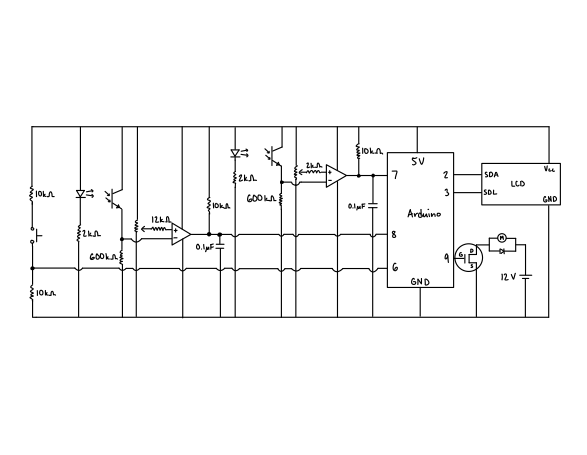
This centrifuge uses the same core sensing logic in two places: an LED (emitter) shining toward a phototransistor (receiver). When the light path is uninterrupted, the phototransistor conducts differently than when the light is blocked. A comparator turns that analog change into a clean digital high/low signal that the Arduino can read reliably.
Core electrical behavior
- The LED is forward-biased through a resistor.
- The phototransistor switches between conduction states based on received light.
- The phototransistor output feeds a comparator, producing a digital pulse suitable for microcontroller interrupts / digital reads.
Implementation 1: Rotational speed counter (optical tachometer)
- A rotating feature (or marker on the rotor) periodically blocks the LED light.
- Each interruption creates a high/low pulse.
- Pulse frequency (f) (Hz) is proportional to RPM:
[ RPM = \frac{60 f}{\text{pulses per revolution}} ]
This provides real-time speed feedback for closed-loop control.
Implementation 2: No-touch command (optical “button”)
- Instead of the rotor blocking light, the user’s hand blocks the LED path.
- When the comparator output indicates the light is blocked, the Arduino interprets it as a command:
- Initiation (start) on the first hand-block event
- Cancellation (stop) on the second hand-block event
This improves accessibility, supports operation with gloves, and reduces contamination from repeated physical contact.
System Block Diagram
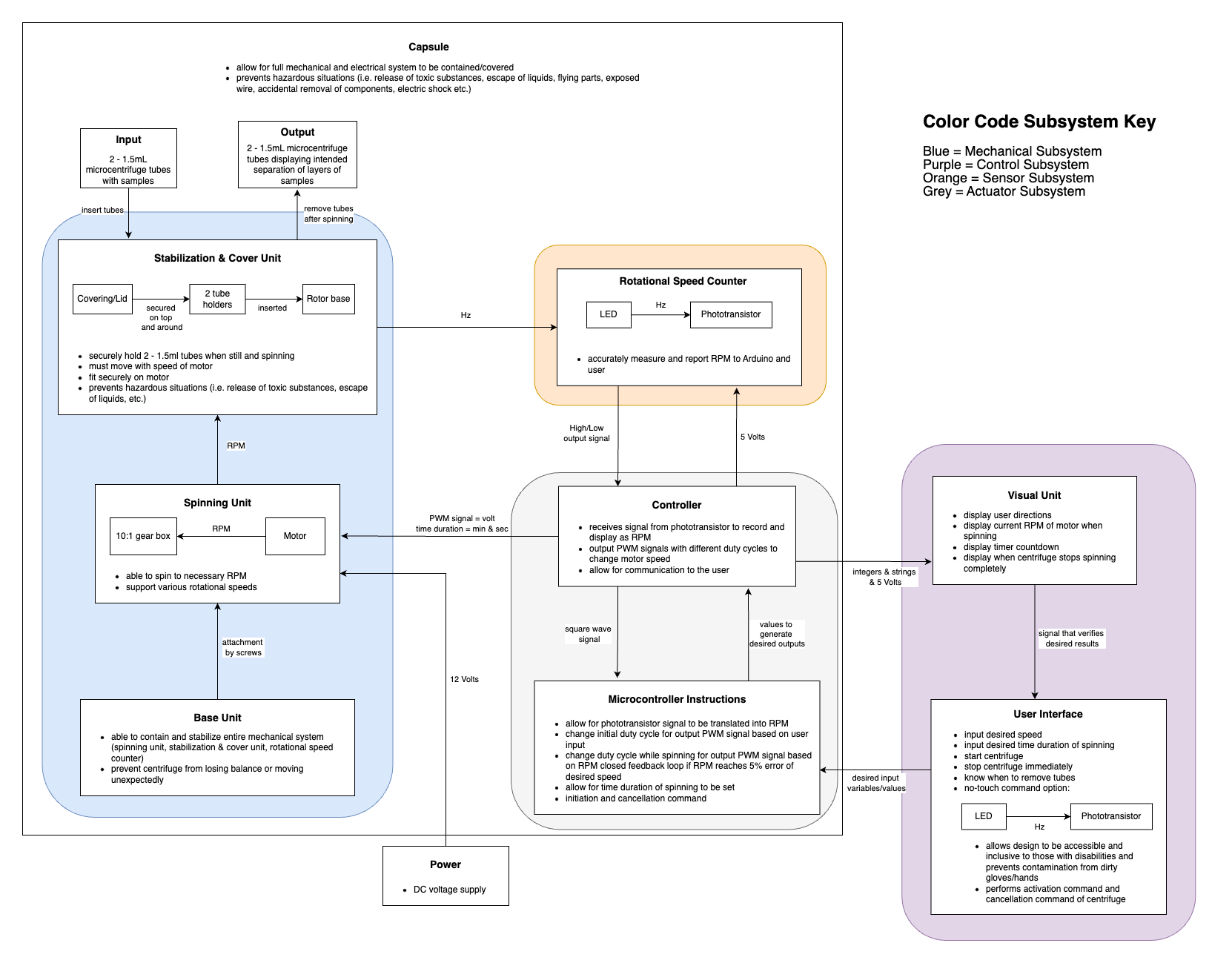
System Overview (Closed-Loop Electromechanical Control)
This centrifuge is a closed-loop electromechanical system designed to:
- Spin microcentrifuge tubes at a user-selected RPM
- Maintain that RPM using real-time feedback
- Run for a specified duration
- Stop safely and notify the user when complete
It consists of four interacting subsystems:
- Mechanical subsystem (blue) – holds tubes and produces rotation
- Sensor subsystem (orange) – measures rotational speed
- Control subsystem (grey) – processes signals and regulates motor speed
- User interface subsystem (purple) – allows no-touch input and displays status
Power is supplied by a DC voltage source shared across subsystems.
Mechanical Subsystem (Blue)
Capsule
The capsule encloses the system for:
- Safety: prevents exposure to spinning parts, liquids, and electrical connections
- Containment: keeps material enclosed if a tube breaks or leaks at high RPM
Stabilization & cover unit
- Covering/lid: locks down the system before spinning
- Tube holders (2): secure 2–1.5 mL microcentrifuge tubes
- Rotor base: transfers rotational motion from the motor to the tubes
Key requirement: the tube holders remain stable at rest and at high speeds to avoid imbalance.
Spinning unit
- DC motor: converts electrical energy into rotational motion
- 10:1 gearbox: trades motor speed for higher torque and controlled RPM
Why a gearbox is used:
- Raw DC motors spin too fast and with low torque for this application
- The gearbox yields usable RPM ranges and improved stability
Motor speed is controlled electronically using PWM (Pulse Width Modulation).
Base unit
The base anchors the motor/gearbox/electronics and prevents vibration-induced movement, maintaining alignment between rotating and stationary components to reduce wobble during high-speed operation.
Sensor Subsystem (Orange) — Rotational Speed Counter
Components
- LED (emitter)
- Phototransistor (receiver)
These form an optical tachometer. Each rotor interruption generates pulses that the Arduino counts to estimate RPM (see equation above), enabling real-time feedback.
Control Subsystem (Grey)
Microcontroller (Arduino-based)
The microcontroller is the brain of the centrifuge. It:
- Reads RPM pulses from the sensor
- Computes actual RPM
- Compares it to the desired RPM
- Adjusts motor PWM duty cycle to regulate speed
- Tracks spin duration
- Sends status updates to the display
PWM motor control
The motor is driven using PWM: a square wave where duty cycle determines motor speed (higher duty cycle → higher average voltage → higher RPM). The motor is powered by 12 V; the microcontroller modulates speed via its control signal, and a common ground is shared between logic and motor circuits.
Closed-loop feedback logic
- Measure RPM from sensor
- Compute error: (Error = RPM_{desired} - RPM_{measured})
- Adjust PWM duty cycle
- Repeat continuously
The system targets a ±5% tolerance to avoid constant oscillation.
Timing and safety
The spin duration is tracked in software. When time expires:
- PWM is set to zero
- Motor stops
- User is notified via the display
An initiation and cancellation command is always available.
User Interface Subsystem (Purple)
No-touch input (optical button)
This subsystem uses the LED–phototransistor + comparator logic described above as a gesture-based button. When the user blocks the light path, the phototransistor changes state and the microcontroller interprets it as a start/stop command.
Visual unit (LCD display)
The display shows:
- Operating instructions
- Current RPM (live feedback)
- Countdown timer
- Confirmation when spinning has stopped
Electrically, it receives 5 V logic power and data (integers/strings) from the microcontroller.
Power Subsystem
- 12V DC: motor power
- 5V DC: microcontroller, sensors, LCD
The design uses a shared ground across subsystems; separating high-current motor power from 5 V logic helps keep sensor readings and display output stable.
End-to-End Signal Flow Summary
- User sets RPM and time (no-touch input)
- Microcontroller initializes PWM
- Motor spins rotor (through gearbox)
- Optical sensor measures RPM (pulses)
- Feedback sent to controller
- PWM adjusted to correct speed
- Timer expires
- Motor stops
- Display notifies user it’s safe to remove tubes
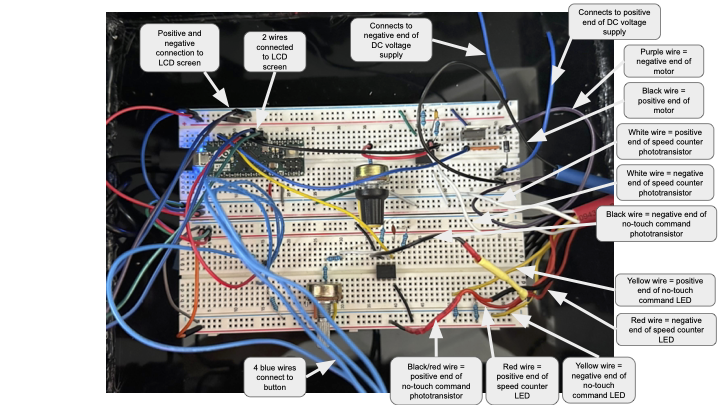
Circuit Implementation (Built + Schematic)